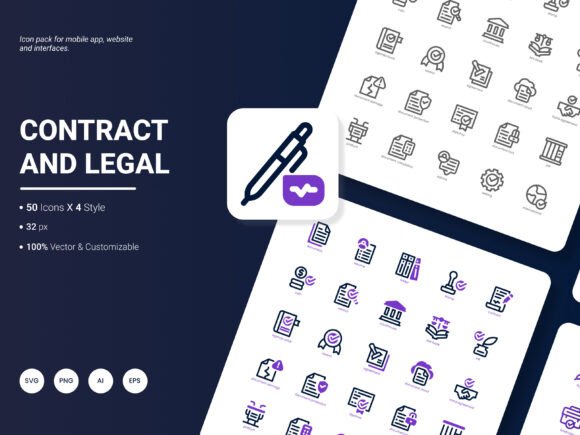
Contract and Legal Icon Pack: 200 Stylish Icons
Finding the right visual language for contracts, legal services, and compliance topics can feel limiting. Many icon sets offer only a handful of legal symbols, leaving gaps when you need to illustrate nuanced ideas. The Contract and Legal Icon Pack solves that by delivering 200 carefully crafted icons that go far beyond the standard gavel and scale. This collection covers paperwork, signatures, courts, agreements, privacy concepts, and modern legal tech themes, all in one cohesive bundle.
Users evaluate an icon pack through different lenses. A freelance web designer might ask, “Will this look crisp on a responsive law firm site?” An educator might think, “Can I use these in a slide deck without reformatting everything?” A small business owner might simply want icons that make a contract template feel trustworthy. Understanding those distinct needs shapes how this particular set fits into your workflow.
What You Get Beyond a Simple Collection
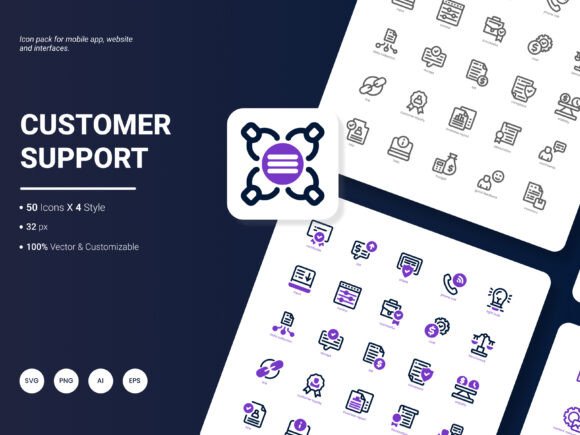
The pack isn’t just a folder of images. It’s structured to support a broad range of projects. The icons depict popular legal ideas—contract signing, negotiation, dispute resolution, corporate law, intellectual property, notary services, and more—presented in four contemporary styles. That variety means you can choose a minimal line icon for a clean mobile app interface or pick a bolder filled version for an eye-catching infographic. Every icon goes through a design process that balances recognizability with a modern, friendly aesthetic, so even dense legal content feels approachable.
Why Different People Care About This Icon Set
Beginners and hobbyists often look for resources that lower the barrier between an idea and a finished product. The availability of ready-to-use PNG and JPG files lets someone with limited design experience drag icons directly into a presentation or Canva project. The consistent proportions and spacing also prevent that jarring look that comes from mixing mismatched graphics.
Experienced designers and creative professionals tend to prioritize editability. Here, the vector source files—AI and EPS—allow deep customization. You can change stroke thickness, adjust corner radius, or recolor shapes to match a brand palette. SVG versions make it simple to animate icons for web interactions or incorporate them into a design system. The fact that the set includes four distinct visual styles means you can even build a theme switch without hunting for complementary icons elsewhere.
Marketers, entrepreneurs, and small business owners often think about speed and consistency. When you’re preparing a proposal, an analytical report, or a client dashboard, visiting multiple free-icon sites can eat up time and lead to inconsistent visual quality. Having 200 legal-themed icons in one organized pack lets you stay on brand while moving fast. An insurance agent, for example, could use the same family of icons on a quote comparison chart, an email newsletter, and a printed brochure, giving every touchpoint a polished, professional feel.
Educators and trainers care about clarity and instructional value. Legal concepts taught in a classroom or online course become easier to grasp when abstract ideas—like due diligence, settlement, or arbitration—get a simple visual anchor. The icons can live inside presentation slides, handouts, or e-learning modules, reducing cognitive load for students who are new to the topic.
Matching Formats to Your Workflow
One overlooked factor when choosing an icon set is how well it plays with your existing tools. The Contract and Legal Icon Pack ships with six formats—AI, EPS, SVG, PNG, PDF, and JPG—so you’re not forced to convert files before getting started. A developer building a legal marketplace on Webflow or WordPress will likely reach for the SVGs first. Someone assembling a printed contract guide in InDesign might prefer the AI or EPS originals for perfect scaling. Meanwhile, a project manager adding icons to a Google Docs report can quickly insert a transparent PNG without leaving the browser.
Because the icons are fully editable, you aren’t stuck with the default colors or line weights. In illustration software, you can tweak every anchor point. Even within a presentation app, you can often recolor the PNG versions using built-in image adjustment tools, though the vector formats give the greatest freedom.
Choosing a Style That Speaks to Your Audience
The set’s four styles open up distinct possibilities. A law firm targeting corporate clients might gravitate toward a monoline, muted style that feels serious and refined. A legal technology startup introducing a chatbot for consumer rights could prefer a duotone or colorful iconic approach that feels friendly and modern. Because all styles cover the same icon subjects, you can even mix them intentionally—using a solid version for primary navigation and a line version for secondary buttons—while maintaining a visual thread.
When the style matches the audience, trust builds faster. A nonprofit offering free legal clinics might use warm, rounded icons to signal approachability. A contract management platform, on the other hand, might stick with sharper, more structured symbols that imply precision and control. The pack doesn’t force you into one aesthetic; it gives you the flexibility to adapt.
How Legal and Contract Icons Fit Into Everyday Projects
It’s easy to imagine these icons living exclusively on a lawyer’s website. In practice, the use cases are far wider. An HR department can use them in an employee handbook to highlight sections on workplace policies and confidentiality. A blogger writing about freelancer contracts can break up long text posts with visual markers for clauses, payments, and deadlines. A data analyst presenting compliance metrics can replace generic bullet points with icons that reinforce the subject matter at a glance.
Popular icon subjects in this pack include document reviews, digital signatures, handshake agreements, courtroom settings, privacy shields, and intellectual property symbols. These concepts pop up in industries ranging from real estate and finance to healthcare and education, which means the icons retain value across multiple projects rather than being tied to a single niche.
Practical Considerations for Beginners and Non-Designers
If you don’t have design software, don’t worry. The JPG and PDF formats provide ready-to-place images that work in virtually any program. Many beginner users download an icon set, open a PNG file, resize it, and place it directly onto a social media graphic or a Word document header. Because the icons are professionally crafted with a consistent grid and clear spacing, they hold up even when you need to scale them for a banner or thumbnail.
One tip for beginners: start with one style and stick to it throughout a single project. That consistency instantly elevates the look without requiring advanced skills. As your confidence grows, you can open the vector files and experiment with color overlays, secondary stroke treatments, or subtle shadows.
Long-Term Value for Teams and Freelancers
Freelancers and agencies often think in terms of asset libraries. Rather than spending hours every month sourcing contract icons for different clients, having a robust set available cuts turnaround time and gives you more creative headroom. The commercial value isn’t just in the visual output—it’s in the hours saved, which translates directly into better margins and the capacity to take on more work.
Educators who build training materials year after year also appreciate the archival aspect. Legal and procedural modules can be updated without redesigning every icon from scratch. Because the files are layered and editable, you can refresh colors to reflect a new curriculum identity or adapt the visuals as your institution’s brand evolves.
Integrating Icons Into Templates, Infographics, and Reports
Infographics benefit enormously from symbolic imagery. A flowchart explaining the steps of dispute resolution becomes more memorable when each node pairs with a clear icon. Similarly, an analytical report on contract compliance can use small consistent icons in table headers, making dense data feel less intimidating. The PDF and EPS formats ensure that printed infographics remain sharp, while the SVG assets keep your online versions crisp on high-resolution displays.
For those building website templates or mobile application wireframes, the icon set acts as a solid placeholder library that can also ship in the final product. The ability to edit the icons means you can align them precisely with the component’s hover state, active color, and accessibility contrast ratios.
Speed, Quality, and the Editing Advantage
Reliability is often what separates a useful icon pack from a frustrating one. Inconsistently sized icons break alignment. Jagged edges on a resized PNG undermine professionalism. The Contract and Legal Icon Pack addresses these pain points by maintaining iconographic consistency and providing scalable sources. Whether you’re building a 16-pixel favicon or a 500-pixel hero graphic, the lines stay sharp.
The editable nature also means you can extend the pack to cover very specific requirements. Need an icon that shows a contract with a specific clause highlighted? You can open the AI file, duplicate the contract icon, and add a simple highlight element while keeping the same visual DNA. This adaptability is especially valuable for legal technology platforms where generic is rarely good enough.
Who Finds the Most Everyday Benefit
- Web and app designers get a complete toolkit for creating interfaces around legal services, account agreements, or privacy settings.
- Content creators and bloggers can visually punctuate articles about renting, freelancing, or consumer rights without distracting stock photos.
- Small business owners can brand their invoices, proposals, and terms-of-service pages with professional consistency.
- Educators and instructional designers receive a ready-made visual vocabulary for courses on law, ethics, or business operations.
- Corporate communication teams can reinforce internal policy documents and training materials with meaningful, approachable graphics.
Thinking About Your Next Project
Before choosing any resource, it helps to map your immediate need against long-term usefulness. If you only need two icons for a one-off event flyer, a free single-icon download might work. But if you regularly produce content that touches on contracts, agreements, compliance, or legal processes, having a comprehensive, editable set pays for itself in creative freedom. The ability to reuse and adapt icons across websites, slides, handouts, social posts, and printed collateral means the pack becomes part of your visual language rather than a one-time decoration.
We are always looking to improve and expand the set based on real-world needs. Have you encountered a missing concept that would make your workflow easier? Perhaps icons for emerging areas like digital wills, blockchain contracts, or remote notarization? Please share any suggestions for what we should include in our next update. Your practical insight shapes how the icon pack evolves, making it more helpful for everyone who relies on clear, stylish legal visuals.