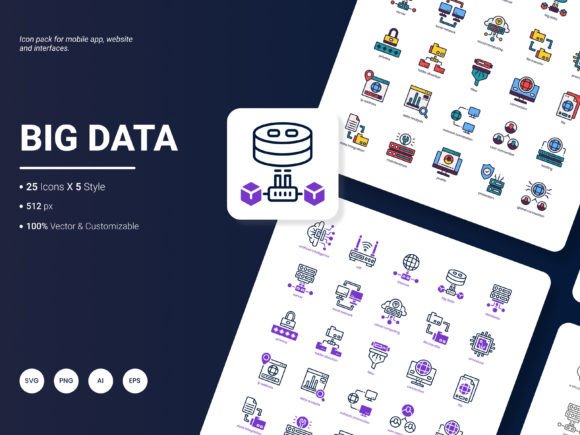
Big Data Icon Pack: A Practical Asset for Modern Visual Projects
When building a website, designing a presentation, or crafting an analytical report, the right visual elements do more than fill space—they guide the eye, reinforce key messages, and create a sense of polish that generic clip art simply cannot match. The Big Data Icon Pack enters this workflow as a curated set of 25 icons that represent the most widely used services and concepts in data-driven environments today. Instead of hunting across multiple libraries or settling for inconsistent styles, designers and content creators can pull from a single collection that balances trend-forward aesthetics with practical usability.
What makes this icon set immediately useful is not just its look but its structure. It arrives in six file formats—AI, EPS, SVG, PNG, PDF, and JPG—covering everything from high-fidelity vector editing to quick raster placement. You get five distinct visual styles, each deliberately crafted so you can match the tone of a project without reworking foundational shapes. Because the icons are fully editable, you retain control over color, stroke weight, and detail, making it far more than a static download. This combination of flexibility and readiness means the pack fits naturally into planning, execution, and even long-term asset management.
Where the Big Data Icon Pack Fits into Your Design Workflow
Visual projects rarely start with polished graphics. Early stages involve wireframes, mood boards, or slide outlines that need placeholder elements to convey structure. Here, the icon pack serves as a rapid prototyping layer. By dropping in a recognizable cloud, database, or analytics symbol from the set, you communicate intent before committing to final design decisions. Because the icons are available as SVGs and high-resolution PNGs, you can use them directly in tools like Figma, Sketch, or even Google Slides without conversion delays.
During the core design phase, the pack’s five style variations let you explore different visual languages without breaking your timeline. One project might call for a minimal line style; another might benefit from a bold, colorful fill. Instead of sourcing separate icon families and hoping they align, you can stay within the same ecosystem and maintain proportional consistency. This reduces the mental overhead of quality control while keeping the design agile enough to respond to client feedback.
After a project ships, the icons continue to add value. Marketing teams can repurpose them for blog posts, social graphics, or internal documentation, preserving the visual identity you’ve established. Since the pack includes both vector and raster formats, non-designers can safely use JPG or PNG versions without needing access to specialized software—something that matters when handing off assets across departments.
Preparing Your Project for Icon Integration
A common friction point in adopting new icon sets is format mismatch. You open a file only to find it’s locked to a single program or resolution. The Big Data Icon Pack sidesteps this by covering the six formats most relevant to modern workflows. Before you even begin, think about where the icons will live. For responsive web interfaces, SVGs are ideal because they scale without losing crispness and can be styled with CSS. For print-ready reports or PDF deliverables, the AI and EPS formats give you full editing power in Adobe Illustrator, while the included PDFs maintain vector fidelity for direct placement into layouts.
Take a few minutes to audit your software environment. Designers working primarily in Affinity Designer or Inkscape will find EPS and SVG files import seamlessly. Presentation builders using PowerPoint or Keynote can drag in PNG files at multiple resolutions. The JPG format, though raster-based, is useful for quick email previews or lightweight mockups. By understanding which format maps to each stage of your process, you eliminate last-minute file conversion scrambles.
Organization plays an equally important role. Create a master folder for the icon pack and subdivide it by style or format. If you work in a team, store this structure on a shared drive or within a design system library. Naming conventions matter: rename files to reflect their function rather than leaving generic labels like “icon_12.png”. A file called “data_server_line.svg” is immediately searchable when a developer needs to implement a specific UI element.
Using the Icon Pack During Active Design and Development
Once planning wraps up, the pack becomes a hands-on tool. For website design, consider mapping icons to navigation cues or feature highlights. A “cloud security” icon can anchor a service description, while “data analytics” fits perfectly next to a KPI dashboard. The five styles allow you to maintain visual separation between sections—perhaps a monoline style for the header and a filled style for feature cards—without introducing visual noise from mismatched sources.
Mobile application design benefits particularly from the set’s consistency. Icons that represent popular services like storage, networking, or machine learning help onboarding screens and settings menus feel intuitive. Developers can ingest SVGs directly into Xcode or Android Studio, adjusting colors through code to match the app’s theme. Since the icons are editable, a designer can quickly tweak stroke thickness to meet accessibility contrast requirements without having to request a new asset.
In presentation and report workflows, the icon pack bridges the gap between dense data and viewer comprehension. Instead of using bullet points to list services, a slide can feature a sleek icon grid. The editable PDF format allows you to place icons directly into Adobe InDesign or PowerPoint with precise positioning. When you need to update a quarterly report template, having a consistent icon set reduces the time spent on visual reinvention. Analysts who aren’t designers can insert PNG icons into Excel dashboards, making spreadsheet-heavy deliverables more readable without a steep learning curve.
Editing and Customizing the Icons for Specific Needs
Off-the-shelf icons rarely fit a brand’s visual language out of the box. The Big Data Icon Pack addresses this through full editability. Open any AI or EPS file in Illustrator, and you can change fill colors, adjust stroke weights, or completely reshape paths. For web projects, SVG code is human-readable, so you can modify attributes like “fill” or “stroke” directly in a code editor—a timesaver for front-end developers who want to keep icon colors synced with CSS variables.
When multiple designers touch the same project, establish a lightweight style guide that documents any customizations. Store a master set of edited icons alongside the originals so future team members don’t have to reverse-engineer changes. If a specific icon doesn’t fully match your concept, use the existing shapes as building blocks. For example, combine the database and globe icons to represent global data storage, then save that new composite as a separate asset within your design system.
Maintaining Consistency and Quality Control Over Time
Long-term projects often suffer from visual drift. A presentation created six months ago might use one icon style, while a new landing page uses another, slowly eroding brand cohesion. By treating the Big Data Icon Pack as a foundational asset, you create a single source of truth. When a new deliverable starts, team members refer to the same folder, not a random web search. This discipline matters especially for freelancers and small business owners who manage their own brand identities without dedicated brand managers.
Quality control also hinges on file integrity. Vector formats like AI, EPS, and SVG maintain crispness at any size, so you never have to worry about pixelation when an icon appears on a trade show banner one day and a mobile screen the next. If a print vendor requests a specific resolution PNG, you can export it from the master vector file rather than relying on the pre-supplied raster versions, ensuring optimal output.
Integrating the Icon Pack with Other Design Resources
No icon set exists in isolation. The Big Data Icon Pack works alongside typography choices, color palettes, photography, and UI components. Its five styles give you enough variation to pair with both minimal sans-serif type and more expressive display fonts. When building infographics, the icons slot in next to data visualizations created in tools like Tableau or Datawrapper, pulling attention to key metrics without competing with the chart’s information hierarchy.
For those who maintain component libraries in Figma or Sketch, consider importing the SVG icons as components. This allows you to swap styles globally across a design file in one action. If your team uses a design token system, map icon colors to your token names so that a brand palette update automatically cascades to every instance. This level of integration reduces manual updates and keeps the design system in sync with the broader product roadmap.
Practical Organization Tips for Individuals and Teams
When you’re a solo creator, staying organized might feel less urgent, but it pays off when you return to a project weeks or months later. Dedicate a folder to the Big Data Icon Pack and version it with a changelog if you create custom variants. Cloud storage services like Google Drive or Dropbox ensure you can access the pack from any device, letting you quickly pull an icon while preparing a last-minute pitch deck on a tablet.
For agencies and in-house teams, the icon pack becomes part of a broader shared asset library. Use a tool like Notion or Confluence to document which style is approved for which use case. Link directly to the folder path so nobody downloads an outdated version. Appoint one person to periodically review the pack for brand alignment and to incorporate feedback that could shape future updates.
Suggestions for a More Dynamic Icon Collection
No toolbox is ever truly complete. As design trends shift toward more dynamic and interactive visual languages, the demand for animated icons or icons that reflect real-time data states may grow. Similarly, expanding the set to include industry-specific concepts—such as blockchain structures, environmental metrics, or healthcare data—could broaden its relevance across sectors. If you have ideas on what should be included in a future release, your input directly shapes the pack’s evolution. The creators encourage you to write to them with any suggestions so the next update addresses the missing pieces you encounter in your daily work.
Making the Big Data Icon Pack a Staple in Your Creative Process
Adopting a single, well-structured icon set removes friction that accumulates across dozens of micro-decisions. Instead of questioning whether an icon is the right size, style, or format, you move faster because those questions have already been resolved. The Big Data Icon Pack provides 25 focused, editable icons covering popular services and concepts, delivered in six formats and five styles so it slots into almost any creative pipeline. By organizing the files thoughtfully, integrating them into your design tools, and maintaining consistent customizations, you turn a simple download into a reliable resource that supports presentations, mobile apps, websites, reports, and everything in between. The real value appears over time, as repeated use builds a cohesive visual identity that audiences recognize and trust.
Treat the icon pack not as a one-off purchase but as a building block. Pair it with solid color choices, readable type, and clear layout structures. When you need to iterate—whether updating a dashboard or refreshing a pitch deck—return to the same source. The icons remain fresh because they are editable and style-varied, allowing you to reinterpret them for new contexts without losing their core identity. In a landscape where visual consistency often slips through the cracks of fast-paced projects, having a go-to icon resource simplifies both the creative and the logistical sides of design work, letting you focus on what you’re actually trying to communicate.