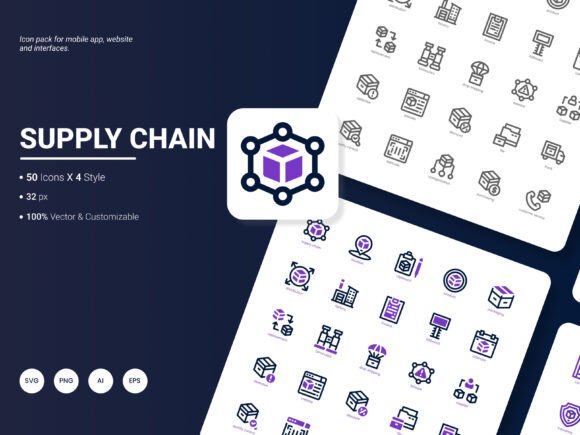
Supply Chain Icon Pack: 200 Stylish Icons for Modern Design
When you are building a website, assembling a presentation, or designing an app interface, the smallest visual details often carry the most weight. The Supply Chain Icon Pack is a curated collection of 200 stylish icons that represent popular services, logistical concepts, and operational ideas. Rather than spending hours searching for mismatched graphics or trying to draw your own, you can turn to one cohesive set that already feels polished, modern, and ready to use.
What makes this icon pack stand out is not just the quantity of icons, but the thoughtful variety built into how they are delivered. You receive the artwork in six distinct file formats — AI, EPS, SVG, PNG, PDF, and JPG — and across four visual styles. That flexibility means the icons can slide into nearly any workflow without forcing you to adapt your existing tools or design habits.
Who Actually Needs a Supply Chain Icon Pack
At first glance, a supply-chain-themed icon set might sound narrowly targeted at logistics companies or freight consultants. Look closer and the subject matter broadens considerably. The icons depict concepts like inventory management, procurement, distribution networks, warehousing, delivery tracking, sourcing, and sustainability. Those ideas show up in far more places than you might expect. A startup founder pitching an ecommerce platform to investors might use them in a pitch deck. A marketing manager crafting a quarterly report on operational efficiency might drop them into an infographic. A freelance web designer working on a client site for an agricultural cooperative could use them to visualize the journey from farm to table.
Because the icons are built around systems and movement of goods, they overlap with topics relevant to retail, manufacturing, technology, consulting, education, and even government services. Different audiences will naturally find different entry points into the same icon pack.
For the Busy Marketer or Small Business Owner
Time is the resource you cannot stockpile, and every minute spent fiddling with design elements is a minute not spent on strategy or customer relationships. The Supply Chain Icon Pack reduces that overhead by giving you a ready-made visual vocabulary. If you are preparing a monthly analytics report, an email newsletter, or a social media carousel, drag-and-drop icons help you communicate faster and more clearly than text alone. The PNG and JPG formats make it painless to drop icons into Canva, Google Slides, or PowerPoint without worrying about compatibility. Because the icons are editable in their vector formats, you can also change colors to match brand guidelines without any loss of sharpness.
For the Educator or Content Creator
Explaining complex systems through words alone can lose an audience quickly. If you teach business operations, supply chain fundamentals, or project management, having access to clean visuals changes how clearly you can map out a process. Imagine building a slide that walks students through procurement steps using small, crisp icons at each stage. The visual rhythm helps learners retain information and gives your materials a professional feel that signals you respect their time and attention. The PDF and EPS formats are particularly useful if you need to embed icons into printed handouts, course packs, or large-format diagrams.
For the UX Designer or App Developer
Consistency across an interface is non-negotiable for usability. When you design a dashboard that tracks inventory, fulfillment, or fleet movement, every icon needs to feel like it belongs to the same family. This icon pack solves that challenge by providing four style variations within a single set. You can choose the line weight, fill style, or overall tone that matches your product's design language. SVG format is particularly valuable here because it allows for infinite scaling and easy manipulation through code. You can embed icons directly into web pages or mobile apps and style them dynamically with CSS. The editable vector files also let your team tweak proportions or merge icons without starting from scratch.
What the File Formats Actually Mean for Your Workflow
Different projects demand different file types, and it is easy to underestimate how much friction the wrong format can cause. Here is where the six included formats earn their place.
- AI and EPS are the power tools for designers comfortable in Adobe Illustrator or other vector editing software. They preserve complete editability. You can resize endlessly, recolor paths, and break apart individual elements.
- SVG is the web-native format. It remains lightweight, scales beautifully on any screen size, and integrates directly into HTML and CSS. Developers love SVG for its performance and flexibility.
- PNG offers transparent backgrounds and crisp edges, making it ideal for presentations, social media graphics, and mockups where you need a quick raster image with no background artifacts.
- PDF works well for sharing previews or placing icons into documents destined for print. It also plays nicely with cross-team collaboration when non-designers need to view or use the artwork.
- JPG may seem basic, but for certain quick-use scenarios where file size or upload compatibility matters, having it available saves the extra step of exporting from another format.
Having all six formats from the start means you never have to pause your momentum to convert files. Whether you are a beginner who just wants a JPG for a blog post or an experienced creative director who needs the editable AI source file, the Supply Chain Icon Pack meets you wherever you are in your skill journey.
Four Styles, One Cohesive Set
Visual style can make or break a project. The four included styles — covering different line weights, filled and outlined variations, and modern flat aesthetics — serve different moods and platforms. A clean outlined icon might feel right for a minimalist corporate website, while a bolder filled style could work better on a mobile app's navigation bar. The variety also gives you room to grow. If you rebrand in a year or shift your content style, you are not stuck with icons that no longer fit.
Beginners often find comfort in picking one style and sticking with it consistently. More experienced designers might mix styles intentionally to create visual hierarchy, such as using outlined icons for secondary navigation and filled icons for primary action buttons. The important part is that the underlying subject matter remains consistent, so the icon pack does not fracture visually even when you use different styles across the same project.
Editable Icons for Custom Needs
Pre-made icons are valuable, but the ability to edit them multiplies their usefulness. You may need to flip the direction of a truck icon to match a timeline flow, or combine a warehouse symbol with a clock to suggest delivery lead times. Because the vector files are fully editable, these adjustments are straightforward. Even someone with moderate design experience can learn to make small tweaks in a tool like Figma, Illustrator, or Affinity Designer. The editable nature also means the icons can grow with your skills. Early on, you might use them as-is. Later, you may find yourself customizing them heavily to fit unique use cases.
Practical Examples Across Different Roles
Let us ground this in real scenarios so the value becomes clearer across different contexts.
The blogger writing about sustainable sourcing. You are crafting a long-form post on ethical supply chains in the coffee industry. Rather than generic stock photos that feel disconnected, you pull icons representing farmers, transport routes, roasting facilities, and retail shelves. You place them in your featured image and scatter them through the article as visual section dividers. The PNG format with transparent backgrounds makes overlay placement clean and fast.
The independent consultant presenting to a manufacturing client. You need to communicate workflow optimization recommendations. You build a slide deck where each step of the improved process gets its own icon. Because the icons are consistent in style, the client focuses on your message rather than on mismatched graphics. The PDF format lets you easily export handouts that print without degradation.
The ecommerce entrepreneur designing a new site. On your homepage, you want to visually explain how products move from your warehouse to the customer's door. Five icons arranged horizontally — order received, processing, packaging, shipped, delivered — tell the story instantly. Built in SVG, they load fast on mobile and scale perfectly on retina displays without pixelation.
The university lecturer developing online course materials. Your module on global trade benefits greatly from visual aids. You integrate icons into lecture slides, assignment templates, and even the course platform's navigation symbols. The editable vector format means your teaching assistant can translate icon labels into another language or adjust colors for accessibility contrast without needing outside help.
For Beginners and Experienced Users Alike
Beginners often approach icon packs with the concern that they will not know how to use them properly. The Supply Chain Icon Pack lowers that barrier by including formats that work with widely accessible software. If you can use PowerPoint or Canva, you can use the JPGs and PNGs. As your confidence grows, you can explore the vector formats and discover how much more control you have over customizing and scaling the artwork.
For experienced professionals, the value lies more in efficiency and reliability. Instead of commissioning custom icons for each project or browsing multiple libraries to find matching styles, you have a ready-to-use foundation that you can adapt on tight deadlines. The four style variations also mean you can serve different clients with different aesthetic preferences from a single source without starting over.
How Long-Term Usefulness Plays Out
Icons are not typically consumable in the way a single-use stock photo might be. Once you have a license to a well-built icon pack, you can reuse it across future projects indefinitely. A supply chain icon set remains relevant because the underlying concepts — movement, storage, planning, delivery — do not become dated quickly. Even as trends in UI design shift, having editable vector source files means you can evolve the iconography without replacing it entirely. The investment pays forward over time, especially for freelancers and small agencies who build up a trusted toolbox of assets they reach for repeatedly.
What Could Make the Next Update Even Better
No resource is beyond improvement, and the creators of the Supply Chain Icon Pack welcome suggestions. If you find that certain industry-specific icons are missing — perhaps symbols for cold chain management, reverse logistics, drone delivery, or blockchain-based traceability — sharing those needs can shape future versions. You might also want additional style variations, such as duotone or isometric perspectives, which are growing in popularity across product interfaces and explainer videos. Other users may hope for icon font versions or Figma component files for even smoother design workflows. Every suggestion helps the pack evolve in directions that serve real daily work.
Ultimately, the Supply Chain Icon Pack is built around a simple idea: give designers, educators, marketers, developers, and business owners a clean, consistent, and flexible visual toolkit they can trust. With 200 icons, six formats, four styles, and full editability, it slots into an impressive range of projects without demanding that you learn new software or compromise on quality. Whether you are mapping out a global logistics network or simply trying to make a presentation slide look less cluttered, the right icons make the difference — and having them already organized and ready changes how you approach the work itself.