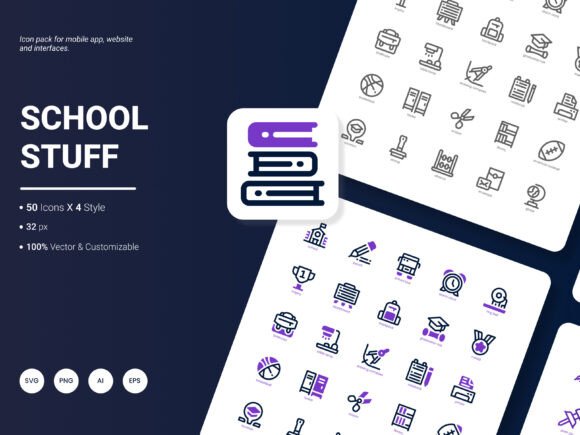
School Stuff Icon Pack: 200 Icons for Modern Projects
The School Stuff Icon Pack brings together 200 carefully crafted icons that reflect popular services, educational themes, and everyday ideas. From classroom essentials to digital learning symbols, the set covers a wide spectrum of visual concepts. It comes in six different file formats, spans four distinct styles, and every icon is fully editable. That means you can change colors, adjust line weights, or resize elements without losing clarity. This adaptability makes the pack useful for websites, mobile apps, presentations, infographics, reports, and templates.
Before diving into how different people might use these icons, it helps to understand the core offering. The collection is built around modern, airy aesthetics that feel current rather than dated. The styles range from clean outlines to filled, flat shapes, giving you flexibility when matching a brand or personal taste. The file types – AI, EPS, SVG, PNG, PDF, and JPG – cover both vector and raster needs, so you can work in software like Adobe Illustrator, Figma, Photoshop, Canva, or even basic document editors. This breadth removes many technical headaches right away.
Why an Icon Pack Like This Matters Across Different Audiences
Visual communication shortcuts like icons help people process information faster. For a beginner building a first website or assembling a school project, hunting down individual icons that match a theme can be time-consuming and expensive. A cohesive pack like the School Stuff Icon Pack eliminates the scavenger hunt. The icons already belong to the same visual family, so they look consistent when placed together. A student creating an interactive timeline, for instance, can pull symbols for books, calculators, science equipment, and graduation caps without worrying about mismatched line styles or incompatible sizes.
An experienced designer might evaluate the same pack through a different lens. They tend to care about scalability, layer structure, and how easily an icon can be adapted to a client’s brand guidelines. Because the set provides AI, EPS, and SVG files, a professional can open a vector file, isolate individual paths, and customize every detail. They might use a few icons from the flat style for a tech startup’s onboarding screens, and then grab the outlined versions for a school district’s annual report. The pack’s editable nature means they are not locked into a default look.
Educators and academic content creators often work under tight deadlines. They need visuals that clarify, not distract. The recognizable subject-matter icons in this pack – think microscopic views, beakers, globes, and pencils – can be dropped into slide decks, handouts, or e-learning modules. Because the icons are delivered in PNG and JPG formats as well, a teacher with limited design experience can simply insert a transparent PNG image into a Word document or Google Slide without needing vector editing skills. The transparency allows the icon to sit comfortably on colored backgrounds.
Small business owners and marketers operating in the education space – like tutoring services, children’s activity centers, or edtech startups – often wear multiple hats. They might design social media posts, flyers, or email newsletters themselves. The School Stuff Icon Pack gives them a library of on-brand visuals that convey learning, growth, and organization. Because the collection offers four style variations, a business can maintain a consistent look across Instagram stories (perhaps using bold, filled icons) and printed brochures (using clean line art) while still feeling unified.
How Different Formats Serve Different Workflows
Not every user needs all six formats, but having them available removes friction. Here is why specific file types matter to different people:
- AI and EPS: Ideal for professionals who use Adobe Illustrator or CorelDRAW. These preserve full editability. A freelance designer customizing icons for a client’s presentation will gravitate here.
- SVG: Perfect for web developers and UI designers. SVGs are lightweight, scale without pixelation, and can be styled with CSS. Someone building a school management dashboard can animate an SVG icon on hover.
- PNG: The go-to for most beginners and content creators. Transparent backgrounds make these easy to layer over photos or colored banners. A blogger writing about study tips can drop a PNG icon into a featured image without any fuss.
- PDF and JPG: Handy for print materials or quick previews. A small print shop owner can place a high-resolution JPG into a flyer layout without needing specialized software.
This format variety means the same School Stuff Icon Pack can slide into a hobbyist’s weekend scrapbook project just as easily as a developer’s cross-platform app prototype. The only difference is which folder they open first.
Four Visual Styles That Expand Creative Possibilities
The pack includes four style treatments, which is not something every icon collection offers. A marketer planning a seasonal campaign might use the filled, vibrant style for a summer camp promotion, then switch to a monoline, minimalist version for a formal grant proposal. A hobbyist creating printable stickers for a school fundraiser can pick the outlined style and color the icons themselves, enjoying the creative process. The styles are complementary, so mixing them sparingly can add visual hierarchy, but using them separately ensures a polished, intentional look.
For freelancers juggling multiple clients, this flexibility reduces the need to buy or download separate icon sets for different project moods. One client might want a playful, cartoonish feel; another might request a sleek, modern aesthetic. Having four styles within a single pack makes it easier to adapt quickly without compromising quality. It also simplifies asset management – everything lives in one organized folder rather than scattered across various downloads.
Practical Scenarios Where the Icons Shine
Imagine a blogger writing an article about effective note-taking methods. They need small, clear visuals to break up long text blocks. The School Stuff Icon Pack provides icons of notebooks, sticky notes, highlighters, and mind maps. Inserting these as PNG images beside each step adds visual interest and makes the content more scannable. The same blogger can later repurpose those icons for a YouTube thumbnail or an email newsletter, maintaining visual continuity.
A mobile app developer building a study planner tool might use the SVG versions for navigation icons – a calendar, a clock, a book, a trophy. Because SVGs stay crisp on high-resolution screens, the final interface looks polished on both a budget tablet and a flagship phone. If the developer needs to adjust the stroke thickness to match their UI guidelines, they can open the SVG in a code editor or vector tool and tweak it directly.
School administrators or event coordinators creating printed banners for a science fair can lean on the EPS and PDF files. They can scale the icons to poster size without losing sharpness. Matching icons for robotics, chemistry, and astronomy create a cohesive visual theme across different displays. Since the icons are editable, they can extract just the elements they need, perhaps combining a flask icon with a text headline in a specific school color.
For entrepreneurs launching an online course, the icon pack becomes a branding shortcut. Lesson modules, downloadable worksheets, and progress checklists can each have a consistent icon. Students begin to associate those symbols with action steps, which improves navigation and retention. The course creator doesn’t need to hire a designer for small graphic elements, saving both time and budget while still delivering a professional-looking product.
Editable, Flexible, and Ready to Integrate
One of the biggest pain points with pre-made graphics is feeling stuck with someone else’s color choices or proportions. The School Stuff Icon Pack addresses this by making all 200 icons editable. For a beginner, that might mean simply dragging a PNG into Canva and changing the tint. For an intermediate user comfortable with vector software, it could mean breaking an icon apart, re-coloring specific shapes, or even combining elements from two different icons to create something new. Advanced users can extract individual paths, adjust anchor points, and embed the icons into complex branding systems.
This editable quality also extends the pack’s lifespan. As design trends shift or a company rebrands, the icons can evolve alongside other visual assets. You are not tossing out a static resource. You are working with a living toolkit that can be refreshed as needed.
Who Might Find the Most Value Here
It’s tempting to say everyone, but the best fit depends on what you prioritize. If your main concern is speed and you need a cohesive set of education-related icons immediately, this pack solves that problem in minutes. If you value long-term flexibility, the editable vector formats and style variety give you room to grow. If you are working on a one-off school project and just want a handful of clean symbols, the 200-icon breadth might be more than you strictly need, but it does leave room for future inspiration.
Publishers of educational workbooks or digital planners may see double value: the icons enhance page design and also serve as functional markers (like “tip,” “warning,” or “check” signs). Consumers who enjoy scrapbooking or making personalized stationery can incorporate the icons into their designs, printing them on stickers, labels, or greeting cards for teacher appreciation events. Even social media influencers who focus on studygram or productivity content can use the icons as consistent visual motifs across their feed.
Keeping the Look Fresh and Trendy
The creators designed this collection to feel amazingly fresh and trendy. That means rounded corners, friendly proportions, and a light, modern feel that avoids the cold, overly corporate look. This aesthetic aligns well with today’s web and app design, where approachable, human-centered visuals often outperform rigid, technical graphics. Whether you are designing a meditation app for students or a classroom rules poster, the icons convey warmth and clarity.
Trendy does not have to mean fleeting. The styles in the pack draw on contemporary design languages – soft curves, balanced whitespace, subtle details – that have proven versatile across various media. This gives the icons enough structure to last beyond a single season.
What Could the Next Update Include
While the current pack already offers strong coverage, every design resource can evolve. Some users might wish for expanded categories that reflect emerging trends in education, like online collaboration tools, hybrid learning environments, or new subject icons for coding and artificial intelligence. Others might appreciate a fifth style variation, perhaps a duotone or a sketch-like hand-drawn option. Including a light and dark mode variant for a selection of key icons could also help app developers working on interface designs. If you have ideas on what should be included in the next update, the creators welcome your suggestions. That kind of feedback helps shape a resource that genuinely serves its diverse user base.
Ultimately, the School Stuff Icon Pack aligns with the way people actually work today: across devices, across software, and often with a mix of skill levels. Its combination of 200 icons, six formats, four styles, and full editability makes it a practical starting point for anyone who communicates visual ideas about learning, organization, or everyday school life. By meeting different audiences where they are – whether that is a beginner opening a PNG for the first time or a professional diving into a layered AI file – the pack earns its place in a well-stocked design toolkit.