Understanding Video and Movies Outline Icons for Informed Design Decisions
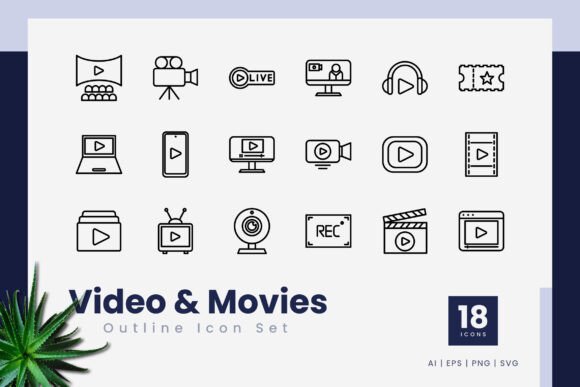
When a project calls for clean, recognizable symbols related to playback, cinematography, or media controls, many designers and content creators turn to icon sets that distill complex actions into minimal line art. The Video and Movies Outline Icons collection represents one such resource — a compact yet carefully assembled set of 18 vector-based icons built around an outline style. For those who are comparing options, evaluating compatibility with existing branding, or simply trying to understand whether a focused icon pack can satisfy a multifaceted workflow, examining the details of this particular set alongside general selection criteria can clarify the decision-making process.
What sets Video and Movies Outline Icons apart from a random assortment of free SVGs is not just the curated theme but the underlying structure: every icon is crafted as a 100% vector file with an editable stroke line. This means the icons scale infinitely without pixelation and can be re-styled in seconds by adjusting stroke weight, color, or even the shape of endpoints. For teams that need consistency across a mobile app interface, a website header, and a printed brochure, this architectural flexibility removes friction. The set arrives in multiple formats — .ai, .eps, .png (with transparency), and .svg — alongside a simple readme document. No mockup preview is included, which keeps the download practical and asset-focused rather than cluttered with presentation gimmicks.
Outline Icons as a Design Category and Where They Excel
Before zeroing in on a specific set, it helps to position outline icons within the broader ecosystem of icon styles. An outline icon uses a single continuous or near-continuous stroke to define the shape, leaving the interior empty. This approach offers high readability at small sizes, pairs elegantly with sans-serif typography, and integrates into both light and dark user interfaces without demanding a separate recolored version. In comparison to solid or filled icons, outlines feel lighter on the page and often communicate a sense of openness, which can be a strategic choice for video players, streaming platforms, or creative tools that want to emphasize content over chrome.
However, outline icons are not a universal solution. In contexts where immediate visual weight is required — for instance, a call-to-action button that must compete with rich imagery — a filled icon might perform better. Outlines can also become faint if placed over busy backgrounds. That tradeoff is not a flaw but a design factor. When evaluating Video and Movies Outline Icons, it is worth noting that the set’s editable stroke line grants control over this very aspect: a designer can thicken the stroke to achieve more prominence, essentially bridging the gap between an airy outline and a bolder line-based symbol without switching to an entirely different icon family.
Practical Use Cases from Print to Screen
The versatility of this icon set becomes clear when we map it to real scenarios. A product designer building a video editing web app might need icons for play, pause, stop, volume, fullscreen, and timeline markers. With Video and Movies Outline Icons, these can be dropped into an interface prototype directly from the .svg or .eps file, ensuring that every touchpoint maintains a consistent line weight and corner style. Because the files are vector, they can be opened in Adobe Illustrator, CorelDraw, Affinity Designer, or free tools like Inkscape, making them accessible across different software ecosystems.
In print and presentation contexts, the same outline icons work as scalable elements in infographics or slide decks. A corporate trainer preparing a video production workshop might use icons to illustrate camera angles, editing sequences, or audio settings. The .png transparency format allows for quick placement into slide design tools without needing to know vector software, while the .svg format suits web developers who prefer inline code control. Having multiple format choices means the set adapts to both high-fidelity design workflows and rapid layout mockups without sacrificing quality.
Compare this to relying on generic icon fonts. Icon fonts often limit customization to size and color, and they can render inconsistently across browsers. A vector graphic with editable strokes, on the other hand, can be customized down to the terminal caps (rounded or sharp) and can become part of a component library where each icon is individually tweaked for specific breakpoints. For a filmmaker’s website menu, such subtle control can reinforce brand identity in a way a static icon font cannot.
Evaluating Scale and Selection Breadth
One of the most obvious characteristics of the Video and Movies Outline Icons set is its size: 18 icons. In a market where massive icon bundles with thousands of symbols are common, a smaller, focused collection might seem like a limitation at first glance. Yet the value of a limited set often lies in curation. Instead of sifting through hundreds of unrelated finance, weather, or food icons, a designer receives exactly what is needed for a video or movie-related workflow. This saves time and reduces visual bloat. For a streaming service app, a video portfolio site, or an educational platform about filmmaking, 18 well-designed, thematically coherent icons can cover a surprising amount of ground — provided those 18 align with the core actions and features.
Still, there are situations where the scope of 18 icons falls short. A video production suite with dozens of unique tools, an advanced media player with niche features, or a multilingual interface requiring variations of the same symbol might outgrow the set quickly. In those cases, supplementing with additional icon packs or commissioning custom work becomes necessary. The key decision factor is inventory: list the exact symbols needed before downloading. If the set includes the essentials and a few versatile extras, it becomes a solid foundation. If gaps appear even before installation, expansion planning is prudent.
Editable Stroke Line: A Closer Look at Flexibility
The phrase “editable stroke line” in the product description deserves attention because it differentiates this set from many free outline icon packs that supply flattened or expanded paths. With editable strokes, a designer can change the stroke width from a hairline to a bold accent with a single slider. They can also convert the stroke to a dashed line for a sketched aesthetic or apply a gradient along the path for a more dynamic look. This level of editable fidelity is especially beneficial for motion graphics where icon animations might rely on stroke reveals, or for brand implementations where the line quality must precisely match a corporate identity’s custom drawing style.
By contrast, many SVG icon libraries distribute shapes that have already been outlined or converted to filled paths, making stroke adjustments cumbersome or impossible without redrawing. The Video and Movies Outline Icons set preserves the stroke as a live attribute in native .ai and .eps formats, while still providing .svg files that retain basic stroke properties for web use. This dual nature means the same icon can serve as a quick web asset and as a deeply flexible master file for complex brand projects.
Comparing Approaches: Individual Sets vs. Subscription Libraries vs. Custom Creation
When weighing icon solutions, professionals often consider three routes: purchasing a focused set like this one, subscribing to a massive icon platform, or creating custom icons from scratch. Each has a different cost-benefit profile.
- Focused sets (like Video and Movies Outline Icons): Lower upfront investment, immediate thematic relevance, full ownership of files, no recurring fees, but limited icon count.
- Subscription libraries: Thousands of icons across categories, frequent updates, often include multiple styles, but require ongoing payments and can lead to generic, overused visuals.
- Custom icon design: Perfect brand alignment, unlimited scope, but high time and cost investment, especially for small teams or rapid projects.
For many mid-sized projects — a specialized app, a branded video channel, a filmmaker’s promotional kit — a purpose-built set like Video and Movies Outline Icons hits a balance between uniqueness and practicality. The vector source files allow further modification, so the icons can be transformed enough to feel proprietary without starting from a blank canvas. It is not a replacement for a full design system, but it can anchor the media control elements within that system.
When the Set Shines and When Alternatives Make Sense
Understanding the best-fit scenario reduces decision regret. This icon set is particularly well-suited for:
- Projects that require consistent outline aesthetics across video player controls, camera icons, film strip symbols, and editing tool interfaces.
- Designers who value editable strokes and need to make frequent weight or style adjustments.
- Teams working in Adobe or Corel environments that prefer native .ai or .eps files over dealing solely with raw SVG code.
- Rapid prototyping where drag-and-drop .png files with transparency save time, while the vector originals remain available for final production.
- Budget-conscious projects that cannot afford custom icon creation but still want a cohesive, legally clear asset (provided the license permits commercial use; always verify).
On the other hand, the set may not be the right choice if:
- The required icon count exceeds 18 and the missing symbols are critical to the core experience, demanding extensive supplementary resources.
- The brand language mandates filled or duotone styles, and converting outlines to filled shapes would be too time-intensive.
- The project serves a very niche filmmaking or video technology sector that needs highly specialized symbols like waveform monitors, color wheels, or codec indicators that a general set does not cover.
- Accessibility requirements demand thicker, more tactile icons with high contrast; while outlines can be thickened, extremely bold strokes sometimes distort the intended shape.
In practice, a hybrid approach often works: start with Video and Movies Outline Icons for the primary media controls and supplement with a few custom-drawn icons or even a complementary outline set from the same designer if one exists. This maintains visual consistency without overcomplicating the asset management process.
Navigating File Formats and Workflow Integration
Having multiple file formats is a practical advantage, but it is worth matching each format to its ideal use. The .ai and .eps files are the mother source: keep these as master files for all editing, stroke customization, and export. The .svg files, while still editable in code, can be used directly in web and app development, with the added benefit that they remain small in file size and support responsive scaling. The transparent .png files are handy for quick tasks — inserting an icon into a keynote presentation, a Notion page, or a social media graphic — without needing to launch a vector editing program.
One consideration not always obvious is the concept of “easy drag and drop.” While the copy suggests effortless placement, the actual ease depends on the user’s software proficiency. For print designers accustomed to Illustrator, dragging an .eps file into a layout is second nature. For a video editor who rarely touches vector assets, even a transparent .png might require stepping through export settings to preserve crispness. Thus, the “easy” claim holds true only within the environment the files are designed for. Evaluating your own team’s technical comfort level is a sensible step before purchase.
Making an Informed Decision Without Overthinking
Icon sets rarely make or break a project on their own, but they influence the perceived polish of a user interface or presentation just as much as typography or color palette. The Video and Movies Outline Icons collection provides a coherent, professionally structured option that respects the needs of both pixel-perfect UI designers and broad-stroke layout artists. It does not promise unlimited variety or style range; instead, it offers a tight, editable base that can be adapted and extended.
When evaluating whether to invest, start with a simple checklist: define the icon needs for the immediate project and any forthcoming deliverables, assess the stylistic fit of outline line art within the visual identity, and estimate how much time editable stroke files could save versus redrawing or hunting for free alternatives. If the answers point toward a manageable icon count and a need for stroke-level flexibility, this set can slot seamlessly into the workflow. If the requirements sprawl across dozens of specialized symbols or demand a radically different visual weight, the same due diligence that highlighted the set’s strengths will guide you toward the appropriate alternative — perhaps a larger library or a custom commission.
Ultimately, design resources function best when they align with the specific contours of a project rather than chasing every possible feature. The Video and Movies Outline Icons set embraces that principle by staying focused, format-rich, and edit-ready, leaving the rest to a designer’s judgment.