Housekeeping Outline Icons: Versatile Vector Graphics
Finding the right visual elements to convey cleanliness, organization, and order can be surprisingly difficult. Generic clipart often feels outdated, while photographing actual cleaning supplies limits flexibility. That’s where a well-crafted set of Housekeeping Outline Icons steps in. This collection provides a clean, modern aesthetic built around simple, stroke-based designs. They’re not just pictures; they’re flexible tools that adapt to digital interfaces, printed checklists, onboarding materials, and brand collateral. Whether you’re designing a hotel app, creating a chores chart, or building an infographic for a facility management company, these icons deliver a consistent visual language that feels contemporary and professional.
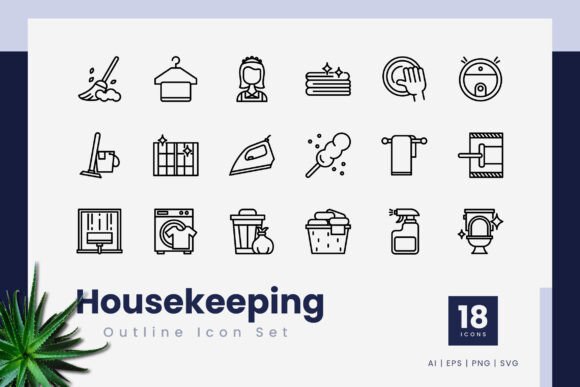
What sets this particular icon set apart is its focus on editable strokes and 100% vector construction. Unlike raster images that pixelate under pressure, these assets scale from a tiny mobile screen to a large trade show banner without any loss of sharpness. The entire collection, containing 18 distinct icons, arrives in multiple file formats—.ai, .eps, .svg, and PNG with transparency—so you’re not locked into one design ecosystem. You can drag and drop them into presentations, wireframes, web layouts, or illustration software, then quickly tweak stroke weight, color, and size to match your unique style guide.
Why Stroke-Based Icons Excel in Housekeeping Contexts
Housekeeping often revolves around action: sweeping, wiping, dusting, mopping. Outline icons naturally suggest movement and process. Their thin, consistent lines feel light and unobtrusive, letting the message breathe instead of overwhelming a composition. In a mobile app, a row of filled, heavy icons can feel cluttered. Outline versions from this set create breathing room. Because every icon is built with editable stroke lines, you’re not stuck with a predetermined thickness. Need a delicate 1px line for a luxury hotel booking interface? Or a bold 4px stroke for an industrial cleaning safety label? You can adjust it in seconds inside Adobe Illustrator, CorelDraw, or any vector editor that opens .ai or .eps files.
Another advantage lies in customization beyond stroke width. Outline icons accept color changes effortlessly. You might use a muted sage green for an eco-friendly brand, a bright orange for a high-visibility instruction manual, or classic black for a minimalist website. Because the icons are vector-based, you can even animate individual strokes for explainer videos or loading sequences. This level of control makes the Housekeeping Outline Icons a long-term asset rather than a one-off download.
What’s Inside the Collection
The package delivers 18 carefully crafted icons covering core housekeeping themes. You’ll typically find representations of a vacuum cleaner, mop, broom, dustpan, cleaning spray, bucket, sponge, trash can, and similar tools. The designers paid close attention to legibility at small sizes; each shape remains distinct even when used as a 16x16px favicon or an app navigation element. Here’s a quick look at what’s included across the board:
- 18 unique icons – focused on cleaning, organization, and maintenance
- 100% vector files – infinite scalability without quality degradation
- Editable strokes – change weight, join styles, and cap shapes easily
- Multiple formats – .ai, .eps, .svg, and transparent PNG
- Drag-and-drop readiness – import directly into your working document
Each format serves a distinct purpose. Adobe Illustrator users will appreciate the native .ai file for deep editing. For maximum compatibility across different graphic software, the .eps format proves invaluable. Web developers and UI designers will gravitate toward the .svg files, which can be styled with CSS or manipulated with JavaScript. And for quick placement in slide decks or social media graphics, the transparent PNG versions save time without sacrificing crispness. The included readme.txt file outlines basic usage notes, but the real value is how effortlessly the icons integrate into existing workflows.
Practical Applications Across Environments
It’s tempting to think of housekeeping icons as niche, but the reality is much broader. Cleanliness, order, and hygiene touch nearly every industry. Below are several real-world scenarios where this icon set can make a tangible difference.
Mobile Apps and Digital Products
Imagine a hotel booking app that lets guests request additional towels or schedule room cleaning. Using generic icons risks confusing users. With dedicated Housekeeping Outline Icons, you can design an intuitive request menu where a spray bottle icon clearly means “cleaning,” a laundry symbol means “fresh linens,” and a trash bin means “remove waste.” The outline style matches modern UI trends like minimalism and neumorphism, keeping the interface feel airy. Since the icons remain editable, you can animate them to provide a subtle feedback loop—a spray bottle gently pulses when the request is sent, rewarding the user with a polished micro-interaction.
Presentations and Corporate Materials
Facility managers, cleaning contractors, and hospitality trainers rely on clear communication. A slide deck explaining a new sanitation protocol benefits immensely from visual cues. Instead of photographs that may include distracting backgrounds or inconsistent lighting, these vector icons provide a uniform, professional look. Drop a mop icon next to a procedure list, or use a broom to mark a “daily sweeping” section. The transparency PNG files can be placed over any colored background without awkward white boxes, maintaining slide aesthetics. If your corporate palette uses deep navy, you can recolor the icons in seconds to match, reinforcing brand identity without starting from scratch.
Print, Signage, and Instructionals
Physical environments need guidance too. In a commercial kitchen, laminated checklists displaying cleaning icons improve comprehension for staff who may not read the local language fluently. A healthcare facility might post hand hygiene reminders with illustrative icons that feel friendly rather than clinical. Because these vectors scale infinitely, you can blow a 2-inch icon up to an A3 poster size and still retain razor-sharp edges. The editable stroke feature lets you thicken lines for better visibility at a distance, ensuring the icon remains functional even when viewed from across a room.
Infographics and Data Visualization
Data stories about sanitation, public health, or household chores benefit from visual anchors. An infographic on the average time spent cleaning different rooms can use a bucket icon for the kitchen, a toothbrush for the bathroom, and a vacuum for the living area. The consistent outline style ties the graphic together, guiding the reader’s eye without competing for attention. Because .svg files are lightweight and code-friendly, you could even embed them directly into an interactive web infographic that changes color based on user input—no external image editing required.
Branding and Marketing for Service Businesses
A residential cleaning service can infuse its logo, business cards, and social media templates with a cohesive icon set. Repeated use of the same sparkle or feather duster icon builds recognizability. When a customer sees that icon on a flyer, they instantly associate it with the brand. Housekeeping Outline Icons offer enough variety to cover different services—deep cleaning, move-out assistance, eco-friendly options—without overwhelming the visual identity. And because you can edit the stroke color, you’re not limited to the default palette; align them perfectly with your branded hues.
Design Efficiency and Workflow Benefits
One of the strongest arguments for using a ready-made vector icon set is speed. Designing 18 original, scalable icons from scratch takes hours, if not days. This collection lets you bypass the sketching, refining, and path-editing grind. You can simply open the file, pick an icon, and adapt it to your project. The drag-and-drop nature means even a non-designer working in something like PowerPoint or Keynote can import an .svg or .png and immediately use it without a steep learning curve.
Maintaining consistency across multiple touchpoints becomes easier too. If you’re building a website, an app, and a printed brochure for the same brand, using icons from one family guarantees visual harmony. Mismatched icons—say a thin line icon on the website and a thick, filled icon in the brochure—can make the brand feel disjointed. This set eliminates that guesswork. You can also create slight variations; for instance, use the same broom icon but with a gold stroke for the premium service page and a green stroke for the eco-friendly service page. The structure stays identical, so recognition persists.
Technical Considerations for Seamless Integration
When you download the icon package, you’ll receive a folder containing the .ai, .eps, .svg, and PNG files. Before you start, it’s wise to check your software version. Adobe Illustrator CS6 and above handle these files smoothly, but older versions might need the .eps route. CorelDraw users often prefer .eps or .svg for direct import. The transparent PNG files typically come in a high resolution (often 512px or larger), making them suitable for web and print mockups, though for true print production, you’ll want to stick with the vector formats to avoid any scaling artifacts.
Keep in mind that the mockup preview is not included—what you see in product displays is just an example of how the icons might look in a real-world setting. The actual files are clean, unbranded, and ready to use without any background scenes. This separation is actually beneficial; you’re not forced to work around a pre-made composition. You decide exactly how and where to place each icon.
Another practical pointer: when customizing stroke weights in a vector editor, check that “scale strokes and effects” is enabled if you’re resizing the whole icon. Otherwise, a large icon might end up with disproportionately thin lines. Most professionals know this, but it’s a small detail that saves troubleshooting later. Also, because the strokes are live paths (not expanded shapes in the source .ai), you can apply dashed lines, arrowheads, or tapered profiles for a more stylized look. This opens up creative directions that go far beyond standard housekeeping visuals.
Choosing the Right Icons for Your Specific Use Case
Not every project needs a full 18-icon lineup. Selecting the most relevant few keeps the design focused. For a residential cleaning app, you might prioritize the vacuum, mop, and spray icons. For a hotel management tool, the laundry, trash, and “do not disturb” equivalents (if included) become critical. Spend a few minutes browsing the icon previews and mapping them to your user’s mental model. Ask: Will a new visitor instantly understand what this icon represents? The outline style helps because it strips away unnecessary detail, but universal recognition still matters. Test at the actual size you’ll use: an icon that looks obvious at 100px might blur culturally at 16px. The high-quality vectors in this set maintain readability, but icon meaning is also contextual.
If your brand values center on eco-friendliness, you could adjust the icons to feel organic—reduce the stroke weight, use a leaf-green hue, and perhaps round the stroke caps for a softer look. For a more industrial cleaning company, a slightly heavier stroke with sharp corners communicates durability. This flexibility turns a single purchase into a brand-chameleon asset.
Real-World Creative Scenarios
Let’s ground this in a few plausible examples. A UX designer at a short-term rental platform wants to add a “report cleaning issue” feature. They pull the appropriate icon from the set, set the stroke to #2D3E50, and place it beside the text. The result feels native to the app’s existing UI—no clunky contrast. A blogger writing about decluttering uses these icons to create a printable “30-day cleaning challenge” worksheet. She imports the .svg files into Canva, recolors them pastel, and arranges them in a calendar grid. Her readers print the PDF and actually use it, partly because the visuals make the task feel manageable rather than overwhelming. An infographic designer creating a wastewater treatment flow chart uses a drain and pipe icon from the set, unifying the technical diagram with a clean, human-centered aesthetic.
These aren’t hypothetical stretches. The very nature of outline icons makes them a blank canvas for interpretation while still carrying enough detail to convey the intended action. You’re essentially getting a professional head start on any visual project related to cleanliness, organization, or facility upkeep.
Ultimately, the value of Housekeeping Outline Icons lies in their combination of technical quality, design adaptability, and immediate utility. They fill a specific gap that stock photography and generic freebies rarely address. As you plan your next digital interface, print campaign, or training deck, consider how this compact yet powerful set can elevate the final product. The right icon doesn’t just decorate a page; it guides the user, reinforces the message, and quietly builds trust. With high-quality vectors, editable strokes, and a range of formats that play nice with virtually every design tool out there, this collection is ready to become a staple in your creative toolkit.