Gaming Outline Icons: Creative Possibilities for Every Project
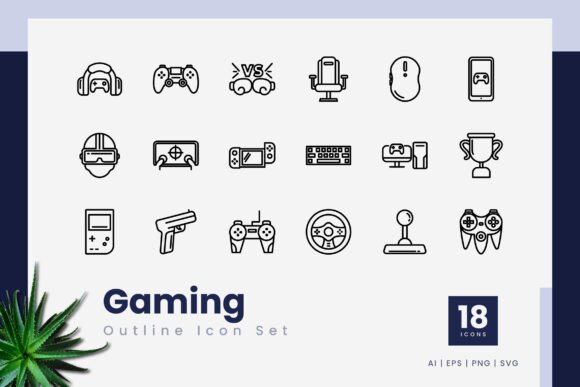
Every designer and content creator understands the quiet power of a clean, consistent icon set. When a project calls for a sleek, modern aesthetic with a gaming edge, you need visuals that communicate clearly without overwhelming the viewer. Gaming Outline Icons arrives as a purpose-built collection of 18 meticulously crafted vector icons, designed to inject that precise energy into your work. This is not just another pack of generic buttons or symbols; it is a flexible toolkit that adapts to mobile screens, printed materials, pitch decks, and intricate illustrations alike. Whether you are a seasoned art director or a blogger searching for the perfect element to anchor a new layout, these icons offer a foundation that is both professional and remarkably easy to manipulate.
What sets vector-based outline icons apart is their intrinsic clarity. The thin, consistent stroke lines refuse to date themselves. They thrive in modern minimalist interfaces, yet they can be thickened, colored, or layered to match a retro pixel-art collab or a bold esports brand. Because the package delivers the source files in multiple universal formats—including .ai, .eps, and .svg—you are never locked into a single application. You can make a quick edit in Adobe Illustrator, export a crisp PNG for a social media banner, or drag the SVG directly into your web project’s code. The versatility is immediate and genuine.
What You Actually Get Inside the Package
Before brainstorming creative directions, it helps to understand the raw materials. Gaming Outline Icons delivers 18 distinct icons, but the real value lies in the depth of the format options. You are not receiving a single flat image per icon; you are receiving a fully editable, infinitely scalable vector file. For design teams working under tight deadlines, the ability to simply double-click a stroke and change its weight, color, or roundness in Illustrator or CorelDraw saves hours of redrawing.
- 18 Unique Icons: Covering core gaming concepts such as controllers, headsets, keyboards, mice, consoles, coins, shields, swords, trophies, and more. Each symbol is designed to be instantly recognizable, even at very small sizes.
- 100% Vector Logic: No pixels drawn here. You can scale an icon to the size of a billboard or a favicon without losing a single sharp edge.
- Editable Stroke Line: The outline style means every line is a path you can customize. Change the cap to rounded for a friendlier feel, or join paths for a unique logo mark.
- Transparent PNGs Included: For quick mockups, drag-and-drop simplicity, or non-vector software like Canva, the PNG files with transparency ensure you can drop them onto any background instantly.
- Essential File Types: The download includes .ai (Adobe Illustrator), .eps (compatible with CorelDraw, Affinity Designer, and legacy software), .svg (web and code-ready), and transparent .png versions. A readme.txt file with basic instructions ensures even newcomers know where to start.
Why Outline Icons Excel in Modern Design
Outline icons, as a category, bring a specific atmospheric quality to a layout. They feel open, airy, and intentional. In a crowded marketplace where solid, heavy icons can sometimes look dated or bulky, the line-based approach of Gaming Outline Icons lets your content breathe. This is especially critical for user interfaces where you want the icon to guide the eye without dominating the text label. Think of a mobile game’s settings menu: a sharp, minimal gear icon drawn with a uniform 2px stroke is far more readable than a dense, filled shape.
From a branding perspective, outline icons also communicate transparency and precision. They pair beautifully with sans-serif typography and generous white space, making them a go-to for tech startups, gaming communities, and digital creators who want to project a clean, forward-thinking image. Because the set is explicitly gaming-themed, you gain the benefit of niche relevance without alienating a broader audience—a controller or trophy icon can work just as well for a fundraising milestone graphic as for a Twitch streamer’s alert overlay.
Creative Applications Across Diverse Industries
The true test of any resource is how far you can push it beyond its obvious label. While Gaming Outline Icons naturally slots into video game UI and esports branding, talented creators will find it blooming in unexpected places. The following applications are not wishful thinking; they are practical, tested approaches that freelancers and agencies can implement starting today.
Mobile App Development and Game UI
A mobile game’s navigation bar lives and dies by its icons. Using the included EPS or SVG files, a UI designer can import the coin, health, shield, or level-up icons directly into Unity, Unreal Engine, or a standard design tool like Figma. The editable stroke means you can quickly tint the icons to match your game’s color palette. If you need a glowing energy bar indicator for a fantasy RPG, take the sword or potion icon, duplicate the stroke, and apply a soft outer glow—suddenly you have a premium asset without commissioning a new piece. For non-game apps, a gamified fitness tracker or a productivity tool with achievement badges can use the trophy and star icons to celebrate user milestones in a visually coherent way.
Website Design and Streamer Overlays
Web designers working on Twitch panels, YouTube channels, or community hubs for gamers will appreciate the immediate thematic alignment. Instead of scouring multiple marketplaces for a headset, microphone, and controller that match stylistically, you get a ready-made family. Insert the SVG directly into your HTML and control the icon’s color via CSS fill or stroke properties. This is a massive win for responsive design: as a user switches to dark mode, you can swap the icon from black to white without loading a separate image. For a streamer’s “About” section, use the headset icon next to a description of their setup, the calendar icon for stream schedule, and the chat bubble for Discord links. Cohesion is effortless.
Presentation Decks and Pitch Books
Marketers and startup founders pitching a gaming-related product need visuals that look custom-made. Generic stock icons often kill credibility. Import the .ai or .eps files into PowerPoint or Keynote, ungroup the elements, and recolor them to your brand’s hex codes. Use the gamepad icon to headline a slide about user engagement, the shield for security features, or the coin for revenue projections. Because the icons remain crisp at any zoom level, you can enlarge them to take over a full slide without pixelation. This simple upgrade makes a pitch deck feel like a professionally branded document rather than a template filled with mismatched clip art.
Print Collateral, Merchandise, and Packaging
If you run a small business selling gaming accessories, custom controllers, or apparel, Gaming Outline Icons can become the subtle decorative element that ties your product line together. Laser engrave the controller icon onto a wooden phone stand, screen-print the headset on a t-shirt, or foil-stamp the sword onto a notebook cover. Because the files are vector, you can send the .ai or .eps directly to a manufacturer without worrying about resolution. A sticker sheet featuring the complete set of 18 icons could be a hit at conventions; just add a few game-related puns and a colorful background. The editable stroke line also means you can easily simplify an icon even further if the printing process requires very thin lines to be thickened.
Infographics and Data Visualization
Adding thematic icons to charts makes statistics memorable. An infographic about the growth of the gaming industry doesn’t need another boring bar graph. Use the coin icon to represent revenue, the user icon for monthly active players, and the globe for worldwide reach. The consistent outline weight ensures that no single icon distracts from the data; instead, they act as friendly visual anchors. Educators and content marketers can build comparison graphics, tutorial step-by-step guides, or checklist illustrations where each line item is led by an icon from this set. The transparent PNG files make it a drag-and-drop affair for anyone comfortable with Canva or Google Slides.
Customization: Making Every Icon Uniquely Yours
A common hesitation with pre-made assets is the fear of looking like everyone else. With Gaming Outline Icons, that fear is unfounded because the editable stroke line turns each icon into a starting point, not a finished product. Open the file in Illustrator and double-click into isolation mode. Here are a few technical, yet approachable, ways to transform the collection:
- Variable Stroke Widths: Duplicate an icon, apply a thinner or thicker stroke, and layer them offset for a techy double-line effect.
- Color Gradients: Convert the stroke to an outline stroke, then apply a metallic gradient for a futuristic, neon-soaked look perfect for cyberpunk-themed projects.
- Icon Combinations: Merge the shield with the sword, or place the coin inside a circle with a trophy. Because the paths are clean, boolean operations in your vector software will yield smooth, professional results.
- Animation Ready: SVG files are a dream for CSS animation or Lottie files. Animate the stroke-dashoffset to make the controller icon draw itself on a website, or create a subtle pulsing effect on the heart icon for a donation drive.
Practical Organization and Workflow Integration
When you receive a file bundle, immediate organization can save hours later. The included readme.txt might seem like a small gesture, but it often contains the license terms and quick links. Develop a personal system: keep the editable .ai master file in your primary design folder, and export a set of scaled PNGs (say, 64px, 128px, and 256px) into your standard asset library. If you work across multiple software—perhaps Sketch for UI, CorelDraw for signage, and Figma for collaboration—the .eps and .svg formats ensure you never need to convert or redraw. Many designers create a single master color swatch document; link your icon colors to these global swatches, and you can recolor all 18 icons with one click when a client changes their mind on brand colors. That kind of efficiency is a quiet superpower in a fast-paced project cycle.
Keeping Your Results Clear, Consistent, and Audience-Friendly
A set of gaming icons only shines when its usage remains intentional. Avoid the temptation to sprinkle icons everywhere like confetti. Instead, treat them as visual punctuation. A strong rule of thumb: use no more than three different icons on a single marketing graphic to maintain focus. If you are designing a website, ensure the icons in your navigation bar, feature cards, and footer share the same stroke weight, even if you changed the color. This subtle consistency tells the user, subconsciously, that the experience is polished. When repurposing the icons for print, always check the minimum line thickness compared to the printing method. Screen printing may require a slightly thicker stroke than offset printing. Fortunately, because the strokes are fully editable, a quick adjustment of 0.5pt is all it takes.
Accessibility also matters. For web use, never rely solely on an icon to convey critical information. Pair it with text or an aria-label. The controller icon alone might mean “games” to some, but to others it could be misinterpreted. Placing “Play Now” beside it brings clarity without sacrificing style. The transparent PNGs can also be adjusted for contrast; ensure the icon color meets WCAG contrast ratios against its background, especially in mobile apps where outdoor lighting can wash out thin lines.
Who Benefits Most from This Icon Set?
The beauty of a well-rounded vector pack is its cross-disciplinary appeal. Gaming Outline Icons serves the indie game developer who needs a quick settings wheel for a prototype just as gracefully as it supports the marketing director building a campaign for a cloud gaming service. Bloggers covering tech and gaming can embed the SVG icons directly into their WordPress posts, giving each guide a professional, magazine-like layout. Educators creating gamified lesson plans use the coins and stars to build printable reward charts. Small business owners, such as esports café owners, can pull these icons into their WiFi password signs, loyalty cards, or social media stories. The unifying thread is that each user receives a reliable, high-quality starting point that drastically reduces the friction between an idea and a polished final asset.
For freelancers who juggle multiple client identities, the value lies in speed. You do not need to sketch a new keyboard icon from scratch; you simply adapt an existing, masterfully drawn one to your client’s aesthetic. This frees up creative energy for the bigger picture: layout, typography, color theory, and storytelling. When a resource saves you two hours of drawing clean outlines, it pays for itself in the first use. And because the license typically covers commercial work, you can use these icons in paid client projects without worry, scaling your business while maintaining a high bar for quality.
No matter your medium or message, the core truth remains: good design is built on good building blocks. Gaming Outline Icons provides a cohesive, customizable, and extremely practical set of those blocks. By mastering the simple act of importing, recoloring, and placing these 18 icons, you equip yourself to produce work that feels intentional, fresh, and deeply resonant with a gaming-aware audience.