Drone Outline Icons: A Practical Evaluation for Creatives and Professionals
Finding the right visual assets can slow down a project more than expected. You might spend hours tweaking a single icon or hunting for a set that looks consistent across different screen sizes. The Drone Outline Icons collection addresses a specific need for clean, drone-related imagery that works in both digital and print environments. It is a vector-based icon kit built around modern unmanned aerial vehicles and their associated symbols. This matters for designers who want to keep file sizes small and scalability high, and for business owners who need to communicate tech-forward ideas without overwhelming a page.
What the Set Actually Contains
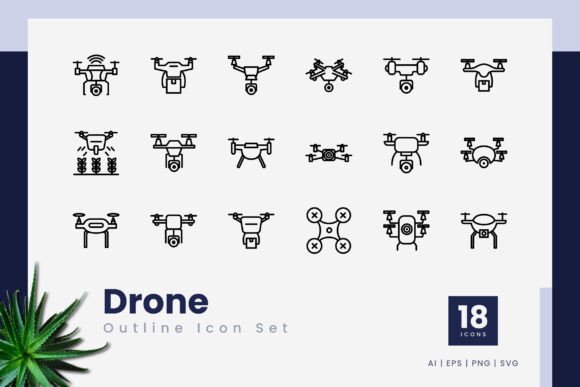
At its core, this product offers eighteen distinct outline-style icons. All are delivered as 100% vector shapes, which means they rely on mathematical paths rather than pixels. That technical detail translates into real-world flexibility: you can enlarge an icon to billboard dimensions or shrink it to a mobile menu bar without losing edge sharpness. The package includes multiple file formats to cover different workflows. You get native .ai (Adobe Illustrator) and .eps files for those who need to edit strokes deeply. There are transparent PNGs for quick web placement, and .svg files that integrate directly into modern web code and responsive designs. A simple readme text file rounds out the delivery, though no mockup previews are part of the download.
Why Stroke-Based Design Stands Out
Many icon packs come with filled shapes that lock you into a specific weight. The editable stroke line feature here gives you control over thickness, joins, and caps. Imagine a startup building an app for drone pilots. They might want a thin line style for a lightweight interface feel, but their marketing department needs bolder icons for a presentation deck. With this set, you adjust the stroke width in a few clicks instead of hunting for an entirely different icon family. This kind of adaptability makes the Drone Outline Icons more of a starter system than a rigid asset dump.
Quality and Consistency from a Professional Lens
When evaluating icon sets, cohesion is everything. A poorly crafted collection will have mismatched line weights, awkward curves, or inconsistent spacing. After testing the files in both Adobe Illustrator and CorelDraw, the geometric precision holds up. Corners align gracefully, and each icon uses a similar optical scale. The drone silhouettes look recognizable without being overly detailed—just what you need for a clean infographic about aerial surveying or a web section on delivery logistics. Consistency across the eighteen symbols means you can use several together in a single layout and they’ll feel like part of the same visual language.
Where These Icons Perform Best
Not every asset fits every context. The outline style naturally leans toward modern, minimalist interfaces and editorial designs. Here are some realistic scenarios where the Drone Outline Icons add genuine value:
- Mobile app navigation: Icons for flight modes, battery status, or GPS lock feel native and unobtrusive.
- Corporate presentations: Agritech companies or logistics firms can use them to illustrate drone fleet concepts without relying on cheesy clip art.
- Website hero sections: A tech blog covering drone regulations could use a subtle outline icon to break up text, keeping the page lightweight.
- Printed brochures or whitepapers: The vector format ensures clean output at 300 DPI and beyond, whether it’s on matte paper or a glossy report cover.
- Infographics and data visuals: Symbols for altitude, speed, or aerial photography fit naturally into charts without overwhelming the data.
Editing and Integration Without Headaches
The promise of “easy to edit and scale” often falls apart when you open a file full of raster artifacts or ungrouped paths. In this case, the layers are logically organized, and modifying colors or turning strokes into dashed lines takes seconds. For web developers, dragging an SVG directly into code and styling it with CSS classes is straightforward. The PNGs with transparent backgrounds drop into tools like Canva, Figma, or Photoshop without blocking content behind them. Even users who aren’t deeply technical can handle the basics thanks to the drag-and-drop simplicity.
Who Gains the Most from This Collection
Small business owners and marketers frequently juggle multiple roles. They might build a pitch deck in the morning, update a website banner after lunch, and draft a social media graphic before the day ends. A focused icon pack like this saves them from licensing multiple images or settling for low-resolution freebies that degrade on Retina screens. Freelance designers and publishers appreciate having a ready-made set that matches a specific niche, because it cuts down research time. Educators creating course materials on drone technology can use these icons to make diagrams more engaging, while still keeping a professional tone.
Strengths Worth Highlighting
After going through the files, a few clear advantages emerge:
- Format variety: The inclusion of .ai, .eps, .svg, and PNG formats covers nearly every modern software pipeline.
- Scalability: True vector construction means no resolution limits, an important factor for both print layouts and high-DPI displays.
- Stroke editability: Changing line thickness lets the set adapt to different brand styles without losing its identity.
- Thematic focus: Rather than a generic tech pack, the drone-specific theme helps projects feel cohesive when the subject is aerial technology, mapping, or delivery drones.
- Lightweight integration: SVG files add minimal load to web pages, which matters for Core Web Vitals and SEO performance.
Realistic Limitations to Consider
No design resource is perfect for every use case. With eighteen icons, this set covers common drone-related concepts—takeoff, landing, camera, remote control, waypoints—but it won’t replace a comprehensive library of hundreds of generic icons. If you need symbols for weather, people, or financial charts, you’ll still need complementary assets. Also, the outline style, while versatile, might not suit brands that require solid, filled shapes or 3D illustrations. Some designers may want multiple variations of the same drone (e.g., fixed-wing vs. quadcopter) in more than one perspective, but this set sticks to a simplified, consistent approach. The download also doesn’t include a pre-made mockup, so you’ll need to place the icons yourself to visualize how they look in context.
Practical Observations on Long-Term Value
Design trends shift, but well-constructed outline icons have shown staying power. They rarely feel dated because they avoid heavy gradients and skeuomorphic details. Five years from now, these drone symbols will likely still look appropriate for clean UI work. The editable nature of the strokes means you can refresh the styling to match evolving brand guidelines. For a one-time purchase, the set provides perpetual licensing that doesn’t tie you to a subscription. That’s appealing for startups and freelancers managing tight budgets, though always check the specific license terms included in the readme file.
Comparing Against Broader Icon Libraries
Massive icon marketplaces give you thousands of options but often dilute thematic depth. The Drone Outline Icons take a different approach: fewer icons, deeper relevance. When your entire project revolves around drone inspection services or aerial videography, having eighteen meticulously crafted symbols beats scrolling through hundreds of generic arrows and checkmarks. The coherence across the set means your marketing PDF, website, and app screen share a uniform visual dialect, which reinforces brand professionalism.
How to Make the Most of This Set
To leverage what this pack offers, think beyond just replacing generic icons. Pair the drone outline with a crisp sans-serif typeface and open white space for a tech-forward landing page. In presentations, use the icons as repeated motifs on each slide header to create a subtle narrative thread. For print projects, convert the .ai or .eps files to spot colors so they match exact brand palettes. Web developers might animate the SVGs with CSS to create a hover effect that brings a drone to life—a nice touch for an interactive product demo.
Direct Answers to Common Concerns
If you’re worried about file compatibility, the .eps format serves as a universal interchange format that works across almost all professional design software. Beginners unsure about editing stroke lines can find plenty of free tutorials online for Illustrator or Affinity Designer, and the learning curve is gentle. The transparent PNGs are ready to use immediately, even if you never touch vector software. And while eighteen icons might seem limited, the focused scope actually reduces decision fatigue; you’re more likely to use every icon rather than let most collect digital dust.
Substance Over Decoration
The real value of the Drone Outline Icons lies in serving a practical communication need. They help users quickly identify drone-related functions without reading a paragraph. For a farm monitoring app, a simple drone icon next to a “scan field” button is immediate and universal. For a logistics report, a drone symbol beside delivery zone maps aids comprehension. This kind of functional clarity, delivered through a technically sound vector package, is what sets apart useful assets from decorative filler.
In the end, the product fills its niche reliably. The combination of editable stroke lines, multiple file formats, and consistent design quality makes it a sensible choice for anyone whose work intersects with drone technology. It won’t replace a full design library, but as a targeted resource, it can sharpen the visual messaging of a wide range of projects. If your recent work repeatedly called for drone visuals and you settled for poorly scaled PNGs or mismatched icons, this set offers a clear upgrade without unnecessary complexity.