Construction and Tool Icon Pack: A Practical Visual Resource for Builders, Designers, and Makers
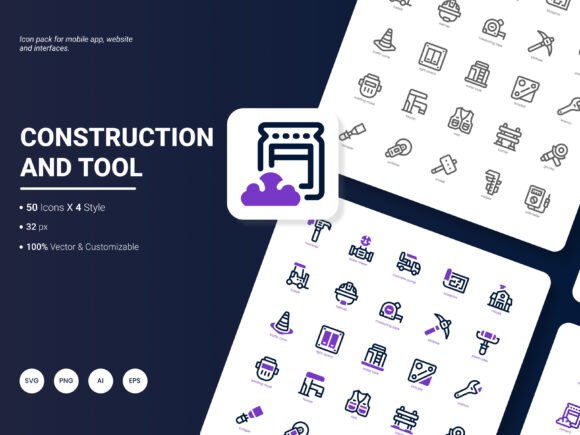
When you're piecing together a website for a home renovation business or laying out a mobile app interface for a handyman service, the small things often carry the most weight. Icons sit at that intersection of function and first impression. They guide the eye, signal meaning before a single word is read, and quietly shape how someone feels about the page they're looking at. The Construction and Tool Icon Pack covers this ground with 200 carefully drawn icons that speak directly to the building, repair, and craftsmanship world.
What makes this particular set worth paying attention to isn't just the number of icons. It's how the pack has been structured for people who actually need to use these graphics in different environments. Whether you're pulling together a last-minute slide deck for a contractor pitch or refreshing the UI of an equipment rental platform, having the same cohesive visual language across every icon removes a lot of friction from the design process.
What the Construction and Tool Icon Pack Actually Contains
At its core, this is a collection of 200 icons that touch on everything you'd expect from the construction and tool vertical. Hammers, wrenches, saws, drills, safety helmets, blueprints, measuring tapes, scaffolding, and heavy machinery all make an appearance. But the pack goes further by including service-oriented concepts too—think renovation, plumbing, electrical work, carpentry, painting, and building inspection. This broader scope means the icons can represent not just the tools themselves, but the services and ideas that surround them.
The icons arrive in six file formats: AI, EPS, SVG, PNG, PDF, and JPG. For someone who works across Adobe Illustrator and Figma or needs to drop a quick PNG into a WordPress site, the flexibility here eliminates the headache of file conversion. You also get four distinct styles, which opens up design options without forcing you to purchase separate packs. The editable nature of the vector files means you can tweak stroke weights, adjust colors to match brand palettes, or even pull apart individual elements if you need something slightly custom.
Where These Icons Make the Biggest Difference
Realistically, tools and construction imagery pops up in far more places than just contractor websites. The applications spread across industries in ways that might not be immediately obvious until you're in the middle of a project.
Website and Landing Page Design
Imagine a local remodeling company that wants to highlight its core services on the homepage. Instead of relying on generic stock photography that every competitor also licenses, the owner or their web designer can pull icons from this pack to create clean service cards. A neat row of graphics showing a kitchen cabinet icon, a bathroom tile icon, and a room extension icon communicates the offerings faster than a paragraph of text ever could. Because the icons share consistent line weights and proportions, the section feels intentionally designed rather than cobbled together from free downloads around the web.
Mobile App Interfaces
For developers building apps aimed at construction project management, tool rental bookings, or even DIY tutorial platforms, interface icons carry heavy functional weight. A confusing gear icon or an ambiguous building symbol can frustrate users. The Construction and Tool Icon Pack includes clearly recognizable shapes that reduce that cognitive load. A user looking for the heavy equipment category in a rental app will immediately understand the excavator or bulldozer icon because it's drawn with familiar, real-world proportions. That kind of intuitive recognition keeps people moving through the app without second-guessing where to tap.
Presentation Decks and Client Pitches
Contractors, architects, and engineers spend a surprising amount of time in PowerPoint or Keynote. Pitching a bid, presenting a renovation timeline, or explaining a structural approach to stakeholders all benefit from visual shorthand. Bulleted lists feel more approachable when each point is anchored by a related icon. A slide about project milestones might feature a blueprint icon for the planning phase, a shovel for ground-breaking, and a completed house for the final walkthrough. The pack's multiple formats make this seamless since you can import the PNG or SVG directly without leaving the presentation software.
Infographics and Analytical Reports
Trade publications, construction market analysts, and real estate researchers regularly publish reports loaded with data. An infographic comparing construction material costs across regions or showing housing start trends over a five-year period benefits enormously from thematic iconography. A small chart showing tool spending trends looks more polished with a wrench or screwdriver icon sitting beside the legend. These small additions make dense information feel more digestible without distracting from the data itself.
Printed Materials and Templates
Business cards for electricians, flyers for home renovation expos, signage at hardware stores, and even invoice templates for independent tradespeople can all carry these icons. Because the pack includes high-resolution JPG and PDF formats, print designers aren't forced to upscale a tiny web graphic and hope it holds together. The vector originals mean the icons remain crisp whether they're printed on a 3-inch card or stretched across a trade show banner.
Who Gets the Most Out of This Resource
The obvious audience includes web designers and UI developers, but the usefulness extends further. A marketing coordinator at a mid-sized construction firm might use these icons to create consistent social media graphics without waiting for the design team. An educator teaching a vocational carpentry course could integrate the icons into instructional PDFs or safety handouts. Freelancers juggling multiple client projects appreciate having a ready-to-use visual library that covers an entire industry vertical in one download. Small business owners who handle their own Canva designs for Facebook posts and Google Business Profile updates can pull these icons directly into their templates.
What ties these different users together is a need for speed and reliability. Nobody in the middle of a tight deadline wants to hunt through five different free icon sites, stitch together a mismatched set, and then realize half the files need color correction. Having 200 icons that already match each other saves hours over the course of a few projects.
Choosing Icons That Actually Fit Your Project
Before grabbing the first hammer icon that looks nice, it helps to think about how the visuals will interact with the rest of your design. An icon style that works beautifully on a minimalist portfolio site might look out of place inside a rugged, industrial-themed equipment catalog. Since the Construction and Tool Icon Pack ships with four distinct styles, you have room to test which approach feels right. A thin-line style might suit a modern architectural firm's website, while a filled, bolder style could better match a hardware store's punchy brand voice.
Color adaptability becomes another practical consideration. Many construction brands lean into yellows, oranges, blacks, and grays. The editable vector files let you recolor anything without losing edge quality. If your client suddenly switches their brand palette from safety orange to deep blue two weeks before launch, you aren't stuck with a miscolored icon set that needs replacing.
Also think about whether the icons will appear predominantly on screens or in print. SVG files scale infinitely for responsive websites and retina displays, while the PDF and JPG formats handle print needs more directly. Knowing your primary output channel helps you pick the right format from the start and avoid a conversion scramble later.
Real Scenarios Where the Icon Pack Solves a Genuine Problem
A digital agency lands a contract to redesign the website for a regional chain of equipment rental stores. The site map includes categories for earthmoving gear, power tools, scaffolding, and safety equipment. Instead of commissioning a custom icon set for thousands of dollars, the design lead sources this pack, adjusts the colors to the brand's teal-and-charcoal palette, and has a fully cohesive icon system in a single afternoon.
Meanwhile, a solo entrepreneur launches an online course teaching basic home repair skills. She needs icons for lesson modules covering drywall patching, faucet replacement, and electrical outlet installation. The pack gives her 200 options organized around exactly these topics. She pulls the relevant SVG files into her course platform, sizes them consistently, and the entire module library looks professionally produced without hiring outside help.
In another case, a construction company's internal training department is building safety compliance materials. The icons serve as visual markers for different hazard categories, personal protective equipment reminders, and tool handling instructions. Because the icons are editable, the training coordinator removes some detail from complex shapes to improve legibility when printed at small sizes on laminated job-site cards.
What to Consider Before Downloading
Check your primary design software's compatibility first. Most modern tools handle AI, EPS, SVG, and PNG without issue, but older or more specialized software might need specific formats. The inclusion of six different file types here covers most bases, but it's worth confirming before you commit to a workflow.
Think about whether 200 icons adequately covers your niche. For general construction and tool imagery, this range proves comprehensive. If you need highly specialized items like specific mining equipment or extremely niche trade tools, you might eventually need to supplement the pack. However, for the broad spectrum of building trades and popular services, the coverage is substantial.
Also plan for how you'll organize the icon files. Two hundred graphics spread across multiple formats and styles can become unwieldy if you don't set up a clear folder structure from the start. Taking fifteen minutes to sort by style or by category before diving into design work saves frustration when you're hunting for a specific icon later in the project.
How Different Industries Put These Icons to Work
Property developers use the icons when creating marketing brochures for new housing subdivisions, adding visual polish without expensive custom illustration. Insurance adjusters who produce damage assessment reports occasionally use tool and repair icons to annotate photographs or break down repair cost estimates. DIY bloggers embed the icons into step-by-step tutorial graphics, giving instructions a cleaner, more professional feel. Trade school administrators incorporate the icons into curriculum maps and student-facing portals, helping learners quickly identify their program modules.
Even local government planning departments have found uses, integrating building and construction icons into public-facing permit guides and zoning information handouts. The icons remove language barriers to some degree, making procedural information more accessible to residents who speak different languages or who benefit from visual reinforcement of written steps.
Making the Most of Editable Files
One feature worth spending time with is the editability of the source files. Beyond basic color changes, you can simplify an icon by removing secondary elements or combine parts of different icons to create something hybrid. A designer building an app for a landscaping company might take the shovel icon from the pack and pair it with a leaf or tree element from another set, creating a unique marker that still feels cohesive. This flexibility extends the pack's usefulness well beyond the 200 base designs.
For teams, editable vector files also mean a lead designer can set up an icon component library once, and the whole team can pull from it without worrying about inconsistency creeping in over time. That consistency matters more than people often realize. When a user sees a mismatched icon—one with thicker strokes, a different corner radius, or an off-color fill—it subtly erodes trust in the product or brand.
Suggesting What Comes Next
No icon set is ever truly finished because the industries they represent keep evolving. The creators behind the Construction and Tool Icon Pack have openly asked for suggestions on what to include in the next update. This openness to feedback reflects an understanding that real-world users often spot gaps that designers might overlook. Maybe the next version expands into more sustainable building icons, capturing the growing interest in green construction, solar installation, and eco-friendly materials. Perhaps construction technology icons representing BIM software, drone surveying, or 3D-printed structures deserve a place as the industry digitizes. Smart home installation icons, covering everything from thermostat setup to security system wiring, could bridge the gap between traditional construction and modern connected living.
Anyone using the pack regularly probably has a wishlist already forming in the back of their mind. The fact that the development team actively invites that input suggests future iterations will continue to reflect what working designers, marketers, and business owners actually need rather than what looks good in a preview gallery.